How I Work With 5 Coding Agents Simultaneously

In a world where writing code became as fast as your thought, you would think it would be an equalizer among software developers. Being a senior or a highly performant coder would be less relevant because so much of what they learned over years is no longer applicable. But it seems that 10x developers didn’t disappear, they just changed. The super-performers now are those that can spend more tokens, manage multiple agents, and still produce quality code.
While the number of developers that write code manually is getting smaller every day, many that do work with coding assistants run a single agent at a time. I was this way for a long time, being sceptical, and reviewing every line of code the AI produced. This is what I’ve been doing all of my career after all.
But working on many agents simultaneously is just more productive, no two ways about it. I am probably producing 3 to 5 times more features and bug fixes now than ever before.
Let me share 7 tips that allowed me to handle the context switches and overhead of juggling so many tasks all at once. Depending on where you are in the “spectrum” of agentic development, they might seem controversial. But if I told you one year ago that you wouldn’t be writing code in an IDE anymore, you probably wouldn’t believe me. And I promise you that 6 months or 2 years from now the following will be standard practice.
1. Have the agent talk only in high level
The only way to be able to work with multiple agents at a time is to reduce the amount of detail you process. That means you need less low-level context in your head and more high‑level context. A big first step to achieve this is simply asking the agent to stop showing code snippets, variable names, and function names. The lowest type of entity I allow the agent to mention is file names. Here are my specific instructions in CLAUDE.md:
## Audience: architect
I know the system design but not the code at a low level. Talk with me at a high, conceptual level, including when presenting a **plan** or a **code review** (findings, diffs, branch reviews):
- **Don't** name functions, variables, or other in-code identifiers — describe what the code *does* in plain language.- **Don't** show code snippets and no SQL.- **Do** name services, the messages/topics they exchange, and the transport between them (queue topic, HTTP endpoint, direct DB read, …).- **Do** name database tables and columns explicitly.- **Do** describe what a migration does (tables, columns, policies, purpose) instead of showing it.- File names are fine to cite, but describe each file's role — what part of the system it is — rather than assuming I know it.
2. Talk to me in Tables
Once you’re juggling between different tasks, it’s really difficult to dive into the context of each one quickly, especially having to read a lot of text. I tried many things to simplify that, and one thing that worked for me is asking Claude to talk in tables.
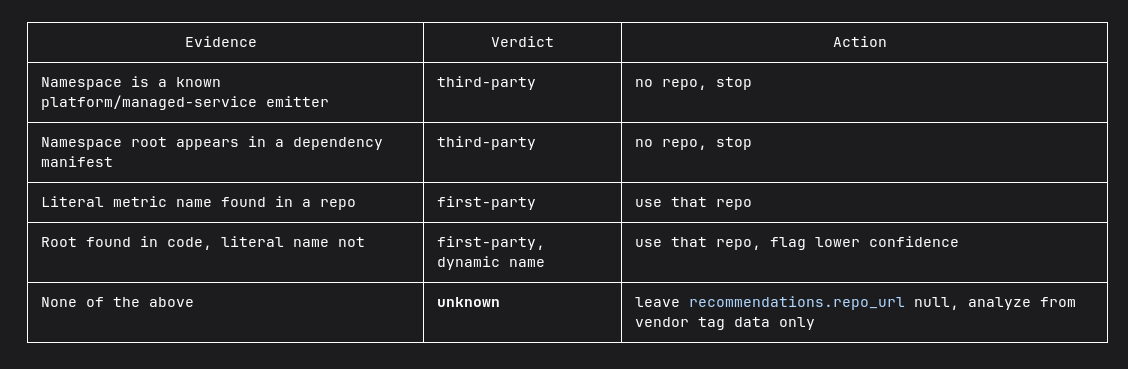
My instructions for this in CLAUDE.md are simply:
... (continuing the audience section above)
Explain everything briefly, in simple words. Prefer explaining in tables or ASCII diagrams.
3. Short plans
I don’t know what instructions the Anthropic team put into plans, but they are excruciatingly long, very specific, and as a result difficult to read. They don’t leave much room for the implementation agent to think, which is a waste I think.
The default plan in Claude Code is more of an “implementation preview” whereas I want a high level plan and I’ll trust the agent with the details in the implement phase.
The solution is a simple set of instructions that helps me understand the plan faster and saves on tokens.
In CLAUDE.md:
### Plan format
Keep plans short — aim for under ~20 lines.
- Lead with a one-line goal, then numbered steps.- Keep each step to a line or two.- Skip alternatives, and risk sections unless I ask.- Skip a verification/testing section unless I ask.- Don't restate my request back to me.- List only files that actually change, with a short note each.- List migrations
The 20-line constraint can be a bit much, so I encourage you to adjust to what suits you.
4. Combine verification and code reviews into one script
After the planning and implementation steps, I usually continue to verifying and to do a code review. Since I’m not looking at the details anymore, I need to be really sure everything was implemented well.
I equipped my agent with browser access, database access, and logs access so it can do a full “manual” verification of anything.
I created a small script that does both verification and code review, and presents the findings together. The script does the following:
A. Write a brief summary of the changes in the feature branch - **The Intent**.B. Given the intent, verify that the changes in this branch do what they were meant to do and prove with evidence (screenshots, videos, request responses, etc.). If you find small and obvious problems, auto-fix them (no need for confirmation).C. Given the intent, do a code review of the changes in this branch. Don't show findings from changes not introduced in this branch. If you find small and obvious problems, auto-fix them (no need for confirmation).It’s important to run the intent summary in a new session to avoid bias from the agent’s thoughts during the implementation and planning sessions.
Each of the steps A, B, C is a skill, but they are executed separately so that each session will have its own context. Steps A and B are executed with claude -p, which is a non-interactive execution mode. The output is saved and step C (also a skill) presents the findings and allows me to continue the interactive Claude session.
Claude is really good at analyzing edge cases and finding a lot of bugs I never thought of. Maybe too good since a lot of the findings prove irrelevant or unlikely scenarios. But I prefer to be over-thorough than sorry later at this stage.
The auto-fix-small-bugs instruction is very helpful here, but still this is the step where I spend most of my time. I’d say this is my “bottleneck” right now for even more velocity, though I’m not sure if I can or should optimize it. Many decisions that the agent recommends I have to disagree with because I still have much more domain context and product context than the agent does.
5. Adaptive end-to-end tests
As much as I trust the agent, the best safety net is still tests. So much things can go wrong in a process where I didn’t see the source code and didn’t test the result in the app at this point.
This might be opinionated, but I much prefer end-to-end tests to unit test. More often than not, when unit tests fail they need to change to adjust to the new behavior rather than they catching a bug. And the frontier agents are very good now, so they are much more likely to cause architectural problems than to break an algorithm or cause some logical bug.
Since e2e tests can be very long, I built a small script that looks at all the changes in the git branch and decides which end-to-end tests are relevant and which should run. This is partly heuristics — look at file names and folders, and if XXX changed then run YYY tests — and partly agentic.
6. Manual testing is still necessary, but as little as possible
Manual verification can take a long time, especially if it’s a complicated flow that can be error prone or take a long time to reproduce. And if you have to do it multiple times to verify the result, that can kill half a day’s work.
My approach is to let the agent handle as much of that as possible. For simple tasks, I’ll ask the agent to run the app and save screenshots. For more complicated tasks, I’ll run the flow myself, doing old‑fashioned QA work. Since I’m still finding many bugs this way, it’s not something I can delegate to an agent anytime soon.
My tip is to do the manual testing step as late as possible to avoid doing it multiple times. That means after you’ve already: ran unit tests and e2e tests, asked the agent to verify the changes and looked at evidence, seen code review findings, and fixed all issues you can without actually opening the app.
7. Stop looking at code reviews
I’ve been looking at code reviews for 15 years, so letting go of this part was really hard. For a long time, I felt compelled to at least sift through the code review, look at changed file names, or quickly scroll through all the changes. It was silly, but it takes time to trust the agent and the verification process. But I promise that once you get over it, your productivity will rise another level.
Final Thoughts
Agentic development isn’t about writing code faster anymore. It’s about becoming a better orchestrator.
The limiting factor has shifted from typing speed to attention management. The more agents you can supervise at once, the less low-level detail you can afford to keep in your head. That means changing how you communicate with agents, how you review their work, and how you build confidence that what they produced is correct.
None of these ideas are mandatory if you’re happy working with a single coding agent. But for better or worse, if you want to advance in your career, the competitive landscape will push you to these practices. Might as well embrace them and be an early adopter.